
Final Exam for Intermediate Excel Class (June 8 – July 6)
Please remember: you must score a passing grade of 80% or above to earn your certificate
Test Summary
0 of 15 Questions completed
Questions:
Information
You have already completed the test before. Hence you can not start it again.
Test is loading…
You must sign in or sign up to start the test.
You must first complete the following:
Results
Results
0 of 15 Questions answered correctly
Your time:
Time has elapsed
You have reached 0 of 0 point(s), (0)
Earned Point(s): 0 of 0, (0)
0 Essay(s) Pending (Possible Point(s): 0)
Categories
- Not categorized 0%
- 1
- 2
- 3
- 4
- 5
- 6
- 7
- 8
- 9
- 10
- 11
- 12
- 13
- 14
- 15
- Current
- Review
- Answered
- Correct
- Incorrect
-
Question 1 of 15
1. Question
1. Why is the AutoFill handle such an effective tool to use?
CorrectIncorrect -
Question 2 of 15
2. Question
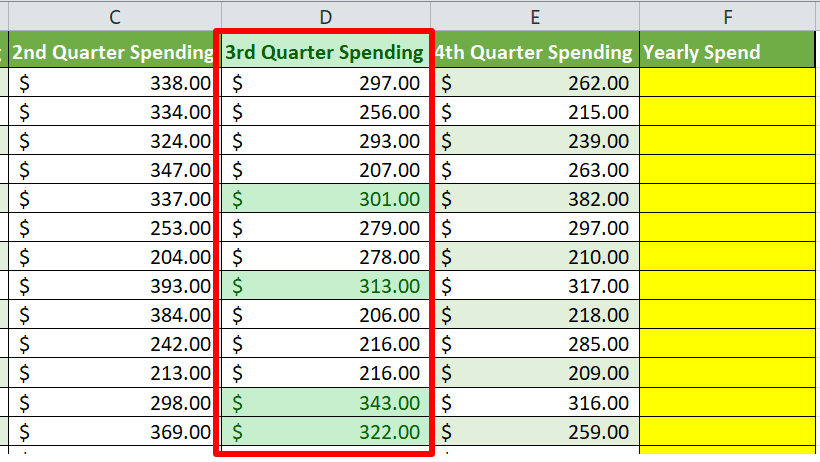
2. Look at the image below. The following image is an example of
 CorrectIncorrect
 -
Question 3 of 15
3. Question
3. What functionality can you use to control data entry errors?
CorrectIncorrect -
Question 4 of 15
4. Question
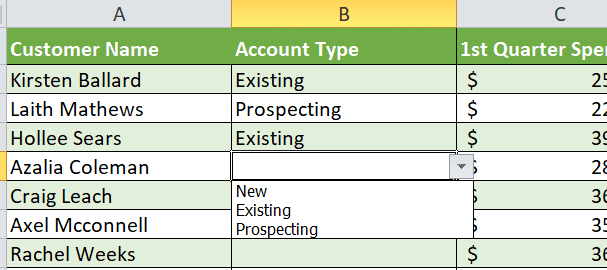
4. What functionality allows you to include a dropdown option in your cells, such as the example provided below?
 CorrectIncorrect
 -
Question 5 of 15
5. Question
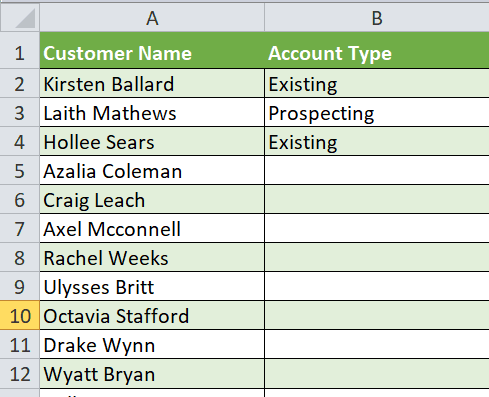
5. Look at the image below. What functionality would you use to split the last name and first name into two separate columns?
 CorrectIncorrect
 -
Question 6 of 15
6. Question
6. Which of the following would be considered a typical delimiter when using Text to Columns?
CorrectIncorrect -
Question 7 of 15
7. Question
7. How many parts are included in the arguments for the LEFT and RIGHT formulas?
CorrectIncorrect -
Question 8 of 15
8. Question
8. How many parts are included in the argument of a MID formula?
CorrectIncorrect -
Question 9 of 15
9. Question
9. What does a CONCATENATE formula do?
CorrectIncorrect -
Question 10 of 15
10. Question
10. What is wrong with the following formula? =CONCATENATE(C2,”-”,D2,Confirmed)
CorrectIncorrect -
Question 11 of 15
11. Question
11. True or False: One of the benefits of formatting your data as a Table is that you can create one formula and it will automatically be applied to the rest of the table without the need of an Autofill Handle.
CorrectIncorrect -
Question 12 of 15
12. Question
12. True or False: There is a SUMIF formula and a SUMIFS formula.
CorrectIncorrect -
Question 13 of 15
13. Question
13. If you are trying to create a SUMIFS formula with 3 conditions, how many commas will you need?
CorrectIncorrect -
Question 14 of 15
14. Question
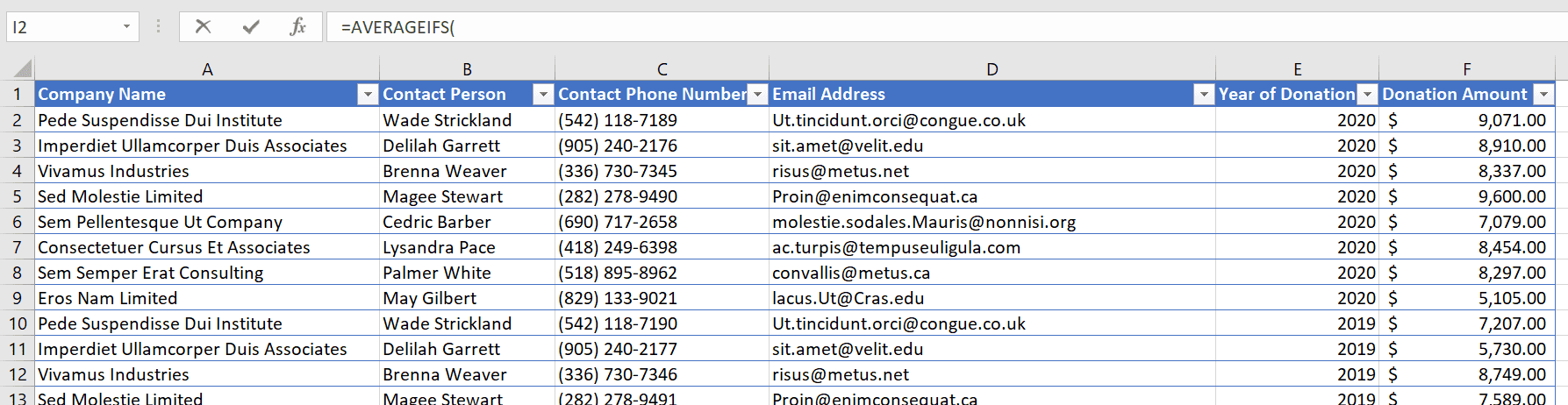
14. Look at the picture below. Which column would you click on first to begin this formula: =AVERAGEIFS(
 CorrectIncorrect
 -
Question 15 of 15
15. Question
15. How many parts are included in the argument for an IFERROR formula?
CorrectIncorrect